
Stop Treating Claude Code Like a Single Assistant
A special edition of Your AI Weekly Roundup. The orchestration layer that turns one agent into a coordinated team, plus persistent memory and goal-oriented planning.

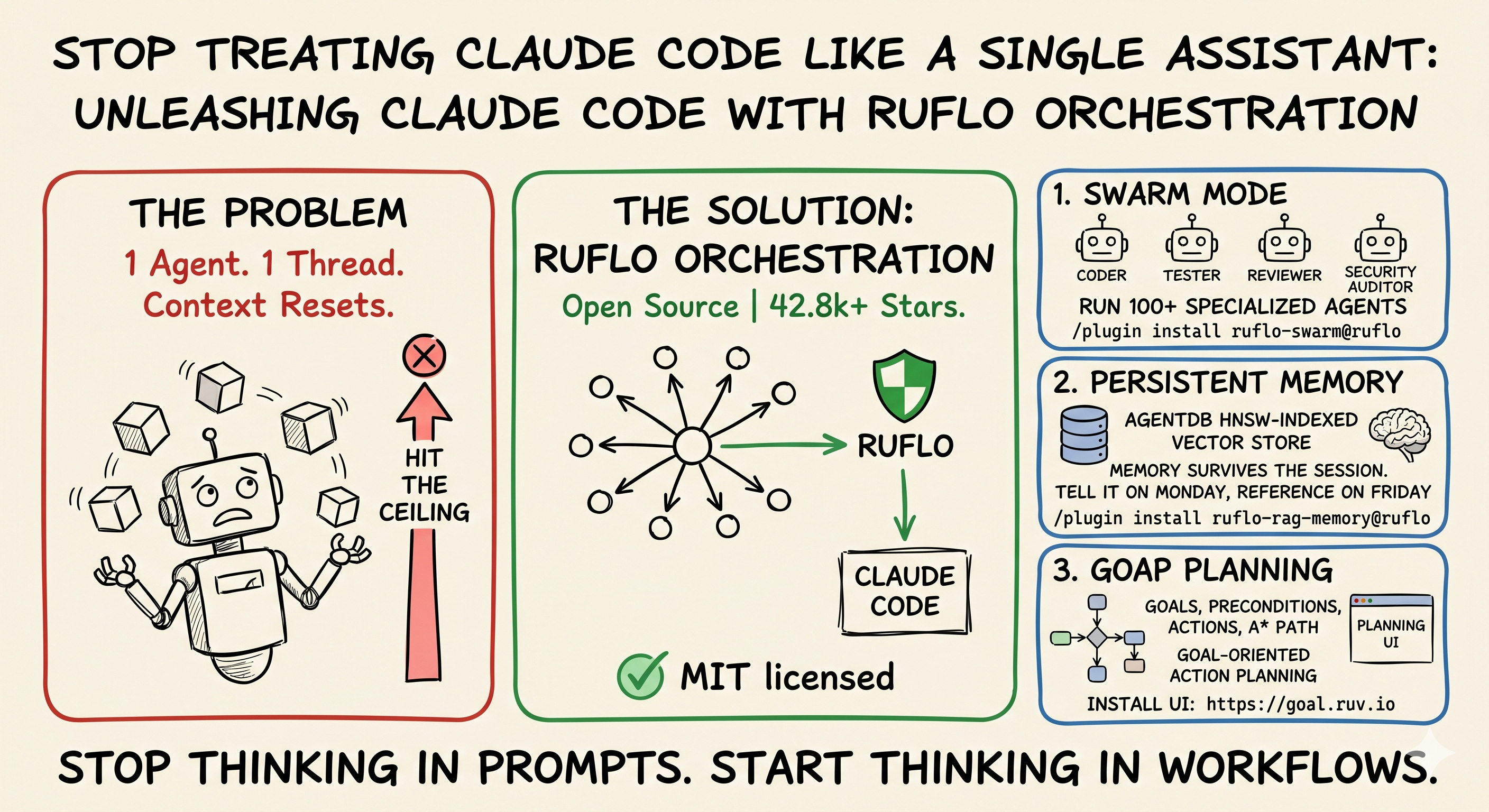
Most people using Claude Code are still treating it like a single assistant.
One agent. One thread. One task at a time.
That works until it doesn’t. You hit the ceiling faster than you’d expect: context resets every session, no shared memory between conversations, no real way to coordinate multiple agents on the same problem. You end up copy-pasting the same project context into every new chat, re-explaining your codebase, re-establishing conventions you settled weeks ago.
There’s a fix that’s been hiding in plain sight. It’s called Ruflo, it’s open source, MIT licensed, and it just crossed 42.8k stars on GitHub. It’s the orchestration layer that sits on top of Claude Code and removes the limits people don’t realize they’re working around.
This week I dug through the repo and the docs to figure out what’s actually worth using. Here are the three capabilities that stood out, what they do, and where they fit into a real workflow.
1. Swarm mode: 100+ specialized agents instead of one generalist
The default Claude Code experience gives you one agent that has to wear every hat. Coder, tester, reviewer, architect, security auditor — same model, same context window, same conversation. It works for small tasks. It strains for anything bigger.
Ruflo’s swarm plugin gives Claude Code access to 100+ specialized agents that self-organize into hierarchies. They share context through a vector memory layer, which means the coder agent and the reviewer agent are working off the same understanding of your codebase, not arguing about it.
What this looks like in practice: you ask for a refactor that touches a dozen files. Instead of one agent slowly working through them sequentially, a swarm spins up. One agent writes the changes. Another reviews them as they come in. A third runs tests in parallel. A coordinator agent keeps them aligned through shared memory. You’re watching a small team work, not a single assistant grinding.
Install:
/plugin install ruflo-swarm@rufloWhere it pays off: anything where the work is naturally parallel. Multi-file refactors. Cross-cutting feature work. Migrations. Anywhere you’d want a teammate writing while you review.
Where it’s overkill: quick scripts, one-file changes, exploratory questions. Don’t summon a swarm for a one-line fix.
2. Persistent memory: stop re-explaining your codebase every Monday
This is the capability most developers don’t realize they need until they’ve lost work twice.
Claude Code’s default memory is session-scoped. Close the tab, lose the context. You spend the first ten minutes of every new conversation re-establishing what you’re building, what conventions you use, what decisions you already made and rejected.
Ruflo ships with AgentDB, an HNSW-indexed vector store that persists across sessions. You tell an agent something on Monday and reference it on Friday. You document an architectural decision once and every future agent knows about it. The retrieval is fast — sub-millisecond on most queries — and it’s smart enough to surface relevant past context without you having to explicitly ask for it.
The technical detail that matters: HNSW (Hierarchical Navigable Small World) is the indexing approach that makes vector search actually fast at scale. It’s the difference between memory that takes a second per query and memory that feels instant. For a tool you’ll hit hundreds of times in a day, that gap is the difference between something you use and something you give up on.
Install:
/plugin install ruflo-rag-memory@rufloWhere it pays off: any project that runs longer than a single session. Codebases you return to. Conventions you’ve established. Past decisions you don’t want to relitigate.
The honest caveat: memory is only as good as what you put into it. If you don’t tell it the things worth remembering, it can’t surface them later. Treat it like a notebook you actually keep open.
3. GOAP planning: describe outcomes, get executable plans
This is the most interesting piece of the project, and the one that signals where the broader agent space is heading.
GOAP stands for Goal-Oriented Action Planning. It’s a technique borrowed from game development — the AI in F.E.A.R. used it back in 2005 to make enemy soldiers feel intelligent. The core idea is that instead of scripting behavior, you describe a goal and let the planner search through possible actions to find a path that satisfies the goal’s preconditions.
Ruflo ported this into a planning UI at goal.ruv.io. You describe an outcome in plain English — “ship the auth refactor with tests and a PR” — and the system decomposes it into preconditions (tests passing, code review approved, branch created), actions (write the change, run the suite, push the branch, open the PR), and an A* path through state space to get from where you are to where you want to be.
The part that makes this different from a normal task list: when something fails, the planner replans instead of restarting. If the tests fail on the first attempt, it doesn’t throw away the work and start over. It re-evaluates state, finds a new path that accounts for the failure, and continues. Failures become new information, not loops.
Try it: goal.ruv.io
Where it pays off: multi-step work where you don’t want to micromanage every sub-task. Complex deployments. Refactors with dependencies. Anywhere the path to the outcome involves more than three or four ordered steps.
Where it’s overkill: any task you can describe in a single sentence and execute in a single session.
The pattern across all three
The thing that struck me reading through the repo is that these aren’t three unrelated features. They’re three pieces of the same shift.
Swarm mode changes who does the work. One agent becomes coordinated team.
Persistent memory changes what they remember. Session-scoped becomes durable.
GOAP planning changes how the work gets organized. Linear prompting becomes goal-driven planning.
Together, they replace a mental model. You stop thinking in prompts and start thinking in workflows. You stop asking “what should I tell the agent to do next?” and start asking “what outcome do I want, and what does the system need to know to get there?”
That’s a meaningful upgrade. And right now it’s a /plugin install away.
If you want to try it
The fastest path in is the Claude Code plugin route:
# Add the marketplace
/plugin marketplace add ruvnet/ruflo

# Install core + the capabilities you want
/plugin install ruflo-core@ruflo
/plugin install ruflo-swarm@ruflo
/plugin install ruflo-rag-memory@ruflo
Or grab the CLI:
npx ruflo@latest init --wizardThe full repo is at github.com/ruvnet/ruflo. The user guide is the best entry point if you want to go deeper than this overview.
A question for you
I’m curious which of the three resonates most. If you could only install one — swarm mode, persistent memory, or GOAP planning — which would actually move the needle for the way you work?
Reply and let me know. I read every response, and the answers shape what I cover in future deep dives.
If this was useful, forward it to one person on your team who’s still copy-pasting context into every new Claude Code session. They’ll thank you.
Back to your regularly scheduled Your AI Weekly Roundup soon.